Excerpt
React is a strange web development framework. I've found that many of their APIs require a specific mindset to use them properly; why is that?
I had this very same question myself for years and years of using React until one day, something clicked. A culmination of years of listening to the React core team's communication mixed with observations of the tools' natural evolution finally made sense.
Today I'd like to share the story behind React that made the library finally make sense to me. This story takes two directions at the same time: One of a historical nature and one derived purely from the code itself.
Why bifurcate this story? Well, I think for most of us, it's easy to assume that React's API surface area was developed piecemeal over time without a centralized theme. But by approaching the library from its origin and exploring the ideas set out by the React team from that time until today, we'll see that isn't quite the case.
Because here's my main thesis I'd like set forth
React is a strange web development framework. I've found that many of their APIs require a specific mindset to use them properly; why is that?
I had this very same question myself for years and years of using React until one day, something clicked. A culmination of years of listening to the React core team's communication mixed with observations of the tools' natural evolution finally made sense.
Today I'd like to share the story behind React that made the library finally make sense to me. This story takes two directions at the same time: One of a historical nature and one derived purely from the code itself.
Why bifurcate this story? Well, I think for most of us, it's easy to assume that React's API surface area was developed piecemeal over time without a centralized theme. But by approaching the library from its origin and exploring the ideas set out by the React team from that time until today, we'll see that isn't quite the case.
Because here's my main thesis I'd like set forth along this story: React has been incredibly consistent in its API design ever since its earliest days. And this consistency leads to a particular mental model you can adopt to quickly become a 10x developer in React.
Along the way, we'll cover:
Without further ado, let's dive in!
### The first days of React
The year is 2011; Facebook has a problem. They've got an in-house framework, "BoltJS" that they're using in-house on their "ads" team. It's working, but there are problems in the code. While ~90% of the problems on the ads product can be written in Bolt, there are instances in the project that the team has had to eject from their own framework and use less declarative solutions.
While this isn't a problem to tackle instantly, it poses a new set of problems for the rampantly growing team at Facebook; 10% applied across a large group quickly becomes a problem in consistency, training, and overall developer experience. Left unchecked, this will inevitably impact their ability to ship as quickly as they'd like.
The problems with BoltJS didn't sit right with one of the members of the ads team — Jordan Walke; few programming paradigms did. In a community interview, Jordan would outline:
Even as I was first learning how to program, the old MVC style of programming with data binding and mutation just never felt right to me, even when I didn't have the technical terminology to describe things like "mutation", or "functional programming".
My code would usually look really weird to other people [...]. For the longest time I just assumed "welp, I guess I'm just a weird programmer". Then I finally took a course on programming language fundamentals [...] and I finally had some basic terminology to be able [to] describe how I wanted to build applications.
So Jordan began to experiment with his own solutions to many of the problems he perceived Bolt and other frameworks had at the time. This experimentation began life as a personal project of "FaxJS". FaxJS would go on to be shortly renamed to "FBolt" (Functional Bolt) before making its way to being called "React." A small team begins developing around the virgining tool.
Fast-forward to 2012; Facebook is doing great. So well, in fact, that they've just acquired Instagram for one billion dollars.
Instagram has a mobile app for Android and iOS, but no web presence. The new team at Facebook is tasked with building out their solution to this problem, but with a constraint of their new parent company: Use one of our existing tech stacks to do so.
After some time evaluating both Bolt and React, the team makes a decision; they're going to be the first production codebase to use React.
The team quickly realizes they have something special on their hands; they're shipping quickly, performance seems to be handled well, and the developers love working in their newfound system. A group begins conversations around open-sourcing the project, even from early days.
But now they have a new problem: Facebook now has two solutions for browser rendering between the incumbent Bolt and the up-and-coming React.
The teams of both sit down, discuss heavily, and realize the challenge expands past their wheelhouse. Facebook's IPO is down and the ads product was their big moneymaker; the very team that had just recently moved a large project to use Bolt. It would take them four months to migrate to React; no new features in that time.
Just when it looked like an impossibility for React's adoption inside Facebook, the CTO came into the picture: "Make the right technical choice, and make the right long-term choice — and if there are short-term consequences, I’ll back you up. If you need months to do a rewrite, do it."
The React migration of the ads platform was another win for the team as they saw similar successes as the Instagram adoption.
As 2013 came in, the team that had been pushing for React's open-sourcing would become more and more prevalent in conversation. Eventually they would win the internal battle. Finally, after all that time, React was ready to open-source: At JSConfUS 2013, Tom Occhino and Jordan Walke publicly announced the project alongside the release of code and docs.
Let's explore what the team introduced at that time...
Even in the earliest days of React, the idea of representing your HTML code in a JavaScript file was established.
This provided a large amount of flexibility for the early framework; not only did it enable the ability to sidestep custom template tags for things like conditional rendering logic and loops, but it was fun to work with and allowed fast iteration of UI code.
This meant that code that might've otherwise looked like this:
```plain text
<!-- This is pseudo-syntax of a theoretical framework's template code --> <some-tag data-if="someVar"></some-tag> <some-item-tag data-for="let someItem of someList"></some-item-tag>
```
It could instead look like this:
```plain text
{someList.map((someItem) => (
```
This came with some major benefits:
- Template compilation could occur before runtime — allowing errors to be caught earlier in the development lifecycle
- Since JSX was not a string, it had better XSS protections out of the box without having to require a specific API to do so
- Reuse of JavaScript for flow-control; no need to reinvent the expressiveness of JavaScript in another string-based language
The API for JSX also enabled the "template to JavaScript" transform to stay extremely lightweight. Instead of having to rely on some kind of HTML to JavaScript compiler, the tags of the JSX are able to be trivially transformed to JavaScript functions:
```plain text
// Turns into a straightforward transform to function calls to run on the browser [React.createElement("li", {}, ["Test"])],
```
This also meant that even across code transforms the line of code, an error was thrown could map one-to-one with the final output ran in the browser; great for debugging!
### "Separation of concerns" doesn't mean what you think it means
One of the common cries against JSX was the idea that it broke "separation of concerns." See, most projects broke apart their code based on the language and type of code that was being used early on:
But here's the thing: This is an arbitrary distinction between different parts of the code. Using this system, it quickly becomes a challenge to track down related code.
Instead, the React team proposed (and most modern codebases continue to back) that you should instead split your code based on features:
By doing so, it becomes much easier to follow the pattern of code and aligns more closely with the ideal React code structure.
Further reading: Want to learn the best way to structure your React projects? I outlined my philosophy more in the "Layered React Structure" (LRS) system.
Before React there was Backbone.js. Let's look at a simple counter component:
```plain text
<script type="text/template" id="counter-template"> <p>Count: <%= count %></p> var CounterModel = Backbone.Model.extend({ var CounterView = Backbone.View.extend({ template: _.template($("#counter-template").html()), this.listenTo(this.model, "change", this.render); var html = this.template(this.model.toJSON()); this.$el.html(html); var currentCount = this.model.get("count"); this.model.set("count", currentCount + 1);
```
Here, we're doing a number of things:
-
Reading the initial template from a script tag containing a string representing our template
-
Defining the data model of the component to be used in the template
-
Manually binding to events and reconstructing the template to HTML on request
This is okay, but due to the manual nature of the "Counter" event/data sync, it's easy to accidentally decouple something not intended to be decoupled.
Compare this to an equivalent React's counter from the era:
```plain text
getInitialState: function () { count: this.state.count + 1, <p>Count: {this.state.count}</p> <button onClick={this.increment}>Add 1</button> ReactDOM.render(<Counter />, document.getElementById("root"));
```
While this.setState is in a way an explicit update to the template, a major shift has occurred between Backbone.js:
The template in React's render method isn't just the initial template for the component; it's the template used across time.
In pragmatic terms, this means that we do not need to track what component is being rendered and where when updating app data. In philosophical terms, this can be viewed as a "reconciliation" process rather than a "mutation" of the DOM. This idea comes straight from Jordan's learnings from the functional programming world where data must always be immutable.
And this data isn't static, either! Click the button to trigger the state change of count and your render function will execute immediately; giving you a quick and convenient method of reactivity.
While JSX allowed for lots of flexibility, it meant that templates required a re-execution of all template nodes to construct the DOM with new values.

Without a VDOM, React will re-render all components present
While smaller scale applications wouldn't likely run into challenges with this approach, large DOM trees would incur massive performance implications as a result of this decision.
To solve this, the team used a concept of a "virtual DOM" (VDOM). This VDOM was a copy of the browser's DOM stored in JavaScript; When React constructed a node in the DOM, it made a copy into its own copy of the DOM.
Then, when a given component needed to update the DOM, it would check against this VDOM and only localize the re-render to the specific node.

With a VDOM, React can localize the re-render to only the impacted component subtree
This was a huge optimization that allowed for much more performant React applications to scale outward.
Internally, this worked by introducing a diffing stage to the "reconciliation" step of React. It's worth mentioning that even early React builds had optimized much of the diffing process of the VDOM.

React handles a state change, which triggers a VDOM diff. This diff will lead to a pre-commit update of the VDOM, which is then commited to the DOM itself
Further reading:
Want to learn more about the reconciliation process? Here's a resource I wrote to explain the process more in-depth.
React launched in 2013 with the concept of class-based components; Hooks wouldn't be released until 2019. This was great, as it allowed for modulization of your code, but came with its own problems.
See, a core tenant of components is that they're able to compose; meaning that we can build a new component from existing components:
Without this ability, React would be extremely hard to scale in larger applications. However, the same ability to compose could not (at that time) be said for the internal logic of class-based components.
Take the following example:
```plain text
window.addEventListener("resize", this.handleResize); window.removeEventListener("resize", this.handleResize);
```
This WindowSize component gets the size of the browser window, stores it in state, and triggers a re-render of the component when this occurs.
Now let's say that we want to reuse this logic between components. If you've studied Object-Oriented Programming - where classes come from — you'll realize that there's a good way to do so: Class inheritance.
Without changing the code for WindowSize components, we can use the extends keyword in JavaScript to allow a new class to inherit methods and properties from another class.
While this simple example works, it's certainly not without its downsides. This especially becomes a problem when MyComponent becomes more complex; we need to use the super keyword to allow the base class to continue behaving as it once was:
```plain text
intervalId = null; this.intervalId = setInterval(() => { this.setState((prevState) => ({ counter: prevState.counter + 1 })); const { windowWidth, windowHeight, counter } = this.state;
```
However, miss a super() call or anything between, and you'll end up with behavior problems, memory leaks, or more.
To solve this, many apps and libraries reached for a pattern called "Higher ordered Components" (HoC).
With higher-ordered components, you're able to avoid requiring your users to have super calls across their codebase and instead receive arguments from the base class as props to the extending class:
```plain text
window.addEventListener("resize", this.handleResize); window.removeEventListener("resize", this.handleResize);
```
Prior to hooks, this was the state-of-the-art when it came to component logic reuse in React.
Unfortunately, this required knowledge of what props to expect from the parent component, was challenging to allow TypeScript and other type-checker usage, and ultimately felt like an addon pattern rather than a clean, built-in composition pattern from React itself.
In 2015, React 0.14 was released. This release brought an alternative to class-based components: Function components.
See, class components were described by the React team as "a render function with an added state container." What if we just removed the state container but kept the render function?
This meant that we could take this:
```plain text
var fish = getFish(this.props.species);
```
And simplify it to this:
This was cleaner in many ways, but came with a major caveat: Function components couldn't contain their own state.
This limited its functionality in real-world codebases and, to help avoid a split in code usage, many decided to stick with class-based components for all of their components.
React's Hooks were introduced in React 16.8. With them, a solution to the stateless function components was solved and the baseline for future React features was established.
While previous "smart" components were written using classes and special methods and properties to manage state and side effects:
```plain text
window.addEventListener("resize", this.handleResize); window.removeEventListener("resize", this.handleResize);
```
```plain text
const [size, setSize] = React.useState({ return () => window.removeEventListener('resize', handleResize);
```
This change in API had a number of benefits, the biggest of which going back to the concept of composition.
Whereas with class components the convention for composition (say that 10 times fast!) was higher-ordered components, hooks have... 🥁
Other hooks. 😐
This might sound obvious, but it's this obvious-nature that allows for Hook's superpowers, both current and future.
Let's look at a custom useWindowSize hook:
```plain text
const [size, setSize] = React.useState({ window.addEventListener("resize", this.handleResize); return () => window.removeEventListener("resize", this.handleResize);
```
Notice how we had to change very little code from the WindowSize component itself; this flavor of logic composition allows us to avoid changing much of the code between the initial authoring and the rewrite to abstract this logic out to a custom hook.
This custom hook can then be reused in as many function components as we'd like:
I could talk about side effects in programming for hours. As a short recap of effects at a high level:
-
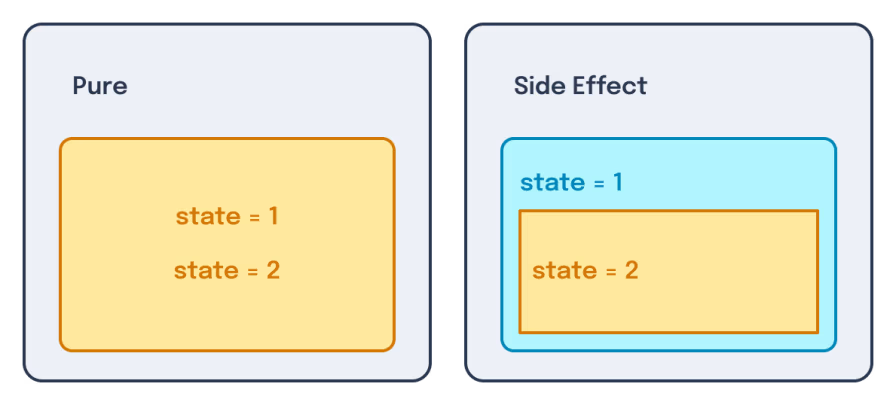
A "side effect" is the idea of mutating state from some external boundary.
As a result of this, all I/O is a "side effect" since the user is external to the system executing the code
-
Most I/O requires some flavor of cleanup: either to stop listening for user input or to reset state set during an output before the next iteration
-
As a result, side effects need a good way to clean up; otherwise your application will suffer from bugs and memory leaks.
Following this thought process, we can see how React's useEffect hook enables us to follow better side effect cleanup patterns.
Let's look at how classes handled side effects:
```plain text
window.addEventListener("resize", this.handleResize); window.removeEventListener("resize", this.handleResize);
```
Compare this to how side effects are registered and cleaned up using useEffect:
```plain text
return () => window.removeEventListener("resize", handleResize);
```
This is a major reason why React never introduced a 1:1 mapping of the old class-component lifecycle to function components; They enabled superior handling of effect management and cleanup.
When React 18 was released, many were surprised to find that various parts of their apps seemingly broke out of nowhere, but only in dev mode. I even wrote an article at the time explaining the phenomenon called "Why React 18 Broke Your App".
What actually had happened is that React intentionally introduced a change to the dev-only helper <StrictMode> component that was included in most React app templates.
Previously, <StrictMode> was mostly used to warn developers when a deprecated API or lifecycle was being used.
Now <StrictMode> is mostly known for the following:
Why was this change made?
The simple answer to this question is that the React team wanted to ensure that you were cleaning up side effects in your components to avoid memory leaks and bugs.
But the longer answer is that they wanted to keep component rendering behavior idempotent.
To explain idempotence, let's use an analogy and then dive into the real deal.
Pretend you're working a factory line, and you've been given a task: Press a button to drop an empty box from a chute above you onto a conveyor belt to move the boxes into a packaging machine. This machine will place an item in the box and seal it up for you.


However, you've been warned by your supervisor: Don't press the button a second time until the first box has been fully packaged. If you do so, the second box will jam the conveyor belt as the machine in the middle of packaging the first box.

An idempotent button would behave differently: It would only trigger the box to enter the factory line once the previous box had gone through the machine, regardless of how many times you pressed the button.
What does this analogy have to do with React rendering and useEffect?
Well, let's consider the following code:
Let's consider each render of "BoxAddition" to be akin to pressing the button on the factory line. If we want to show 10 BoxAdditions, then we should have 10 boxes coming down the pipeline.
But the global box count should remain consistent if we then render and unrender the BoxAddition component. With the code above, this doesn't happen. This means that if we do something like:
```plain text
const [bool, setBool] = useState(true); setInterval(() => setBool((v) => !v), 0); setInterval(() => setBool((v) => !v), 100); setInterval(() => setBool((v) => !v), 200);
```
Because of this, the BoxAddition component wouldn't be considered idempotent; its behavior causes inconsistencies depending on how many times it's been rendered. This aligns with how the button could be considered idempotent only if the button doesn't cause inconsistencies depending on how many times it's been pressed.
To fix this, we'd need some kind of cleanup on our BoxAddition component:
These problematic behaviors on a non-idempotent component are why StrictMode was changed to enforce this behavior.
And this wasn't some bolted-on idea after React 18 or something; Idempotency is so important to React, in fact, that it was mentioned as a core design decision in the second ever talk about React from the Facebook team.
This doesn't mean that authoring your own custom hooks is a free-for-all, however. All hooks follow a consistent set of rules:
- All hooks are functions
- The function names must start with use
- They must be called at the top-level of a component
Regardless of if a hook is custom or imported from React, regardless of when a hook was introduced, whether from the start with useState or much later with the useActionState hook, these rules are to be followed.
```plain text
const [val, setVal] = React.useState(0); obj.key = (obj.key ?? 0) + 1; const [val, setVal] = React.useState(0); for (let i = 0; i++; i < 10) { const ref = React.useRef();
```
Let's explore why these rules were put in place.
### Leveraging the VDOM's full potential
In our story thus far, we've managed to make it to "React 18" and the changes it brought; But before we look forward, we must look back. Let's rewind back to 2016. At ReactNext 2016, Andrew Clark gave a talk titled "What's Next for React". In it, he shares how the team has been working on an experiment called "Fiber."
Notice that?
In Andrew's talk, he references posts from 2014 about what React had planned — it's remarkably similar to the endeavors they published with Fiber! More on that soon.
Despite Andrew's warnings that "this experiment might not work," we can fast-forward to 2017 with the release of React 16 and see that it was released as the new stable engine of React. It was even one of the few React releases to get a blog post on Facebook's engineering blog.
While I'll leave the nuances of how Fiber works in this GitHub repo by Andrew, the broad idea is that it enabled React to:
- Pause work and come back to it later.
- Assign priority to different types of work.
- Reuse previously completed work.
- Abort work if it's no longer needed.
This list is taken directly from Andrew's GitHub explainer.
These abilities required Hooks to operate with the limits they have today, but unblocked a slew of features and set the stage for the future.
The first feature that Fiber unblocked in the React 16 release was error handling. Getting a revamp in React 16.6, built-in error handling solved a long-standing problem with React apps.
See, because of the nature of the VDOM, whenever a component threw an error, it would crash the entire React tree.

Without error boundaries, a component at a leaf node can crash the entire application through a bubbled error event
However, because components are laid out hierarchically, we can establish a boundary between a component that might potentially throw an error and the rest of the application state.

With an error boundary, an error event can only bubble as high as the nearest error boundary. This protects the app itself from crashing
Not only does this work with single nodes, but because components are grouped by their parents we can remove a group of impacted nodes at once by wrapping them in a shared ErrorBoundary:
```plain text
class ErrorBoundary extends React.Component { return <h1>Something went wrong.</h1>;
```

If the error boundary has multiple children, all child nodes will be removed on a caught error
This work would not have been possible without the ability to abort work in Fiber's new reconciliation pipeline.
But error handling updates weren't the only thing introduced in React 16.6; it was here that the React team introduced us to the concept of lazy loading components:
```plain text
const LargeBundleComponent = lazy(() => import("./LargeBundleComponent"));
```
Lazy loading components enable React to tree-shake away the bundled code relevant to only the imported component such that the lazy wrapped component code wouldn't be imported into the browser until the component was rendered:

A page without lazy loading will see all code, used or unused alike, bundled into a single JS file

A page with lazy loading will only load rendered components' code. If a component is not loaded, the code will not be pulled into the browser. If there is shared code between components, it will be de-duplicated into a shared bundle only loaded once regardless of how many components are rendered after-the-fact.
This enabled further usage of the VDOM as a representation of complex state by loading in a component and its associated code over the network (in this case LargeBundleComponent).
But wait, if the component is being loaded over the network, that means there's latency involved. What does the user see when the component is being loaded?
This is where Suspense boundaries come into play. Introduced at JSConf Iceland 2018, Suspense allowed you to handle loading states in your UI as a fallback during high-latency scenarios - like a lazy component mentioned above:
```plain text
const LargeBundleComponent = lazy(() => import("./LargeBundleComponent")); <Suspense fallback={<div>Loading...</div>}>
```
Just like the ErrorBoundary component API was able to handle upward sent errors, the Suspense component API handled upward sent loading mechanisms; allowing even more flexibility with how and where the VDOM handled asynchronous effects.
This stacked well with other problems you might face with loading states like how to handle multiple async sibling components:
```plain text
const LargeBundleComponent = lazy(() => import('./LargeBundleComponent'));const AnotherLargeComponent = lazy(() => import('./AnotherLargeComponent')); <Suspense fallback={<div>Loading...</div>}> <Suspense fallback={<div>Loading...</div>}>
```
While there were hints that Suspense would eventually lead to other features — like data fetching maybe? 👀 — I want to wrap up the work Fiber did for React's future.
While the React's Fiber rewrite enabled a number of features, it was challenging to explain many of the concepts leveraged without abstract examples. It wasn't until React 18 that we saw a slew of new APIs introduced that would allow us to more directly interface with the new rendering behaviors.
These new APIs were called "concurrent features" and included the following APIs:
- useTransition
- useOptimistic
- useDeferedValue
- startTransition
Let's dive into startTransition and see where it leads us.
Let's assume that we have a large list of elements we want to mirror some user-input text onto:
```plain text
const items = useMemo(() => { for (let i = 0; i < 20000; i++) { return list.filter(item => item.toLowerCase().includes(text.toLowerCase())); {items.map((item, index) => ( <li key={index}>{item}</div>
```
Intuitively, we might pass our controlled input state to this SlowList element:
```plain text
const [filterTerm, setFilterTerm] = useState(""); const value = e.target.value;
```
However, if we do this, we'll find that when the user types, it will lag the input box as the list re-renders:
This occurs because the rendering of the list takes longer than the user can type each individual character. To solve this, we'd need a way to tell React to defer updates to the list in favor of the changes to the input element. Luckily for us, this is what Fiber was written to enable. We can interface with Fiber to fix this using the useTransition API:
```plain text
const [filterTerm, setFilterTerm] = useState(""); const value = e.target.value;
```
This change now results in a smoother text update experience:
The Fiber was a massive boon to React's future, no doubt. But it felt like everything that came before React 19 was building towards something bigger; some way to leverage all of the experience that the React team had been preparing for after all this time.
While there are a few APIs that one could assume I'm talking about, the one I have in my mind is data fetching.
See, even externally to the work on Fiber, there had been hints it was coming. For as long as I can remember, the React team had provided guidance to "lift state" in your components to avoid headaches with data sharing. They turned it into an official docs page in 2017 and Dan even referenced this problem in a GitHub comment from 2015.
This "lifted state" is how their data fetching APIs would eventually work in React 19; using the new use API and the existing Suspense API.
Here's how it works:
- Create a stable reference to a promise in a parent component
- Pass the promise to a child component via props
- Utilize the new use hook to receive the data from the promise
- Reuse the Suspense component to handle the loading state of the promise
```plain text
const promise = useMemo(() => fakeFetch(), []); resolve(1000);
```
Let's take a moment to look at how use works internally. According to the RFC the React team introduced for use:
If a promise passed to use hasn't finished loading, use suspends the component's execution by throwing an exception. When the promise finally resolves, React will replay the component's render.
The first thing React will try is to check if the promise was read previously, either by a different use call or a different render attempt. If so, React can reuse the result from last time, synchronously, without suspending.

A parent component passes a promise down to the child which is wrapped in a Suspense component. The "use" hook then throws the promise to the suspense boundary and, when it resolves, resumes again on the child
Knowing what we know now about how use works internally, I think it's safe to say that use wouldn't be able to function the way it does today without the Fiber rewrite's prerequisite capacities. The ability to "suspend" a subtree of nodes to wait for data to fetch is almost identical to the stated goals of Fiber from day one.
And as we can see, using use forces us to raise our data fetching to a parent component. This does two things for us:
1. Re-enforces the concepts we've already learned in regard to data moving up the VDOM tree
2. Helps solve waterfalling and real-world user experience problems
Further reading:
If use's API still feels foreign to you, I might recommend reading through my series on React 19 features, including the use API
But Corbin, unofficial data fetching mechanisms have existed in React for some time! What makes use different?
Well, dear reader, while use is the newest kid on the block for data fetching in React its API has two main advantages:
1. It forces you to raise your fetching logic, helping avoid waterfall data fetching
2. It makes consolidating multiple loading states together become much more trivial
I've talked about the concept of raising data fetching too much at this point to not dive in further; let's do that.
Let's use this code sample as an example of a problematic data fetching pattern:
```plain text
} = useFetch(userId ? `/users/${userId}/posts` : null); if (loading) return <div>Loading posts...</div>; {posts?.map((post) => ( border: "1px solid #ccc", <h4>{post.title}</h4> } = useFetch(`/users/${userId}/profile`); if (loading) return <div>Loading profile...</div>; <h3>{profile.name}</h3> <div style={{ padding: "2rem" }}>
```
I don't see the problem with this code?
Well, while this code is syntactically correct, it's got a major flaw hidden within: The data fetches in a waterfall pattern. The user's blog posts can't load until the profile is finished loading:

Waterfall data fetching will see three network requests wait for the previous to finish. This means that if each takes 100ms then it will finish the last request after 300ms
Compare and contrast to a refactored version of this app to use the use API:
```plain text
{posts?.map((post) => ( border: "1px solid #ccc", <h4>{post.title}</h4> <h3>{profile.name}</h3> () => fetchData(`/users/${userId}/profile`), () => fetchData(`/users/${userId}/posts`), <div style={{ padding: "2rem" }}> <Suspense fallback={<div>Loading profile...</div>}> return fetch(url).then((response) => { if (!response.ok) throw new Error("Failed to fetch data");
```
Here, we can see that we managed to make our API calls in parallel, cutting down the time until the app is finally ready:

Parallel data fetching will see two of the three network requests run at the same time. This means that if each takes 100ms then it will finish the last request after only 200ms
But wait! You can raise your data fetching using your useFetcher as well!
Quite astute! You can indeed!
Let's do that here:
```plain text
if (loading) return <div>Loading posts...</div>; {posts?.map((post) => ( <h4>{post.title}</h4>function UserProfile({ profile, loading, error, children }) { if (loading) return <div>Loading profile...</div>; <h3>{profile.name}</h3> <p>Bio: {profile.bio}</p> } = useFetch(`/users/${userId}/profile`); } = useFetch(`/users/${userId}/posts`); <div style={{ padding: "2rem" }}>
```
This works reasonably well, but now we've introduced a new problem: Loading states are tied more closely to the implementation of our useFetcher API.
Not only are a lot of props passed around, but if we wanted to have one loading state instead of two distinct ones, it would require us to do some decently sized refactor work.
With the use API, this is solved by allowing the user to move their Suspense component usage to anywhere above the use API and have the rest handled by React itself.
### Merging the old and the new: Error handling and data fetching
Something often missed is how updating the screen (called "rendering" in the context of React) is itself a form of a side effect. After all, if all I/O is considered a "side effect," then surely the most predominant form of "output" (updating the screen) is a side effect!
This is true! So true, in fact, that the same mechanism we used earlier (error boundary components) is able to be reused for data fetching errors.
As we can see from this example, our ErrorBoundary component will catch all rejected promises' data passed to the use API:
```plain text
this.state = { hasError: false }; if (this.state.hasError) { return <h1>Something went wrong.</h1>; new Promise((resolve, reject) => { <React.Suspense fallback={<p>Loading..</p>}>
```

A parent component passes a promise down to the child which is wrapped in a Suspense component and an error boundary. The "use" hook then throws the promise to the suspense boundary and, when it throws an error, the error's value is thrown to the error boundary
### A "move" to the server
Server-side rendering, as a practice, has been around for... Well, as long as the web. To write your template in one language and compile it into the primitives the web understands (HTML, CSS, JS) is the core model for everything from WordPress, Ruby on Rails, and — yes — React server-side solutions.
In fact, while there were more out-of-the-box solutions that streamlined React's SSR usage — like Next.js in 2016 — React has had the ability to server-side render all the way back in its second-ever public release of 0.4. It was even highlighted how to use React and Rails together and even in Python on React's official blog shortly after.
Given this, let's explore how even React's server support has deeply nested roots into React's history and previously built feature set.
From React's 0.4 release all the way until React's announcement of the then experimental "React Server Components", server-side rendering in React led to a problem: React would re-render every component from the server once it hit the client.

The developer ships SSR and framework code to the server, which produces HTML. This HTML/CSS is then sent to the user machine where it re-initializes on the client's browser
It wasn't until Next's adoption of React Server Components in 2023 (and later with React 19 when RSCs were made stable) that we had a clear solution for this problem.
Next.js 13.4 (May 4th, 2023) was released before React 19's stable release (December 5th, 2024). While React 19 stabilized the APIs for RSCs, Next.js' "app router" relied on an experimental version of React dubbed at the time "18.3.0-canary". This version, not to be confused with the stable 18.3 version acted as the undocumented early releases for React 19.
See, RSCs enabled React to have a different execution path for client and server code. This execution path allowed the client to intelligently skip over the reconciliation process for nodes that didn't require additional work from what the server had sent:

The developer authors JSX with distinct client and server components. These components are ALL rendered on the server, but only the client components are re-rendered on the client
This optimization of avoiding re-rendering server-only components is done by:
- Implementing a distinction between components that need to be interactive on the client ("use client") and server-only components (the default for components authored without "use client")
- Serializing the state of the VDOM on the server
- Sending the serialized state to the client alongside the hydrated HTML
- Intelligently ingesting the server-sent VDOM on the client
- The VDOM's ability to display a mirrored representation of the browser's document while remaining runtime agnostic.
- React's idempotency guarantees to avoid unintentional behavior between client and server.
- Fiber's ability to bail out of work on already-completed nodes.
- The ability to establish boundaries within the VDOM; whether it be for errors, loading states, or client/server distinctions.
But while RSC's ability to serialize JSX and send it over the wire is undoubtedly cool, it's not the only superpower that RSC has.
Since we finally had an officiated way of operating React on the server, the React team expanded their focus beyond the client-side experience of React and introduced methods of sending and receiving data from the server...
While the React team ultimately decided against using await on the client for nuanced technical reasoning; there's nothing to prevent, say, a backend from the same. As such, this is all it takes to load data from a server component:
That's right! No wrapping our await in a cache (after all, the server component doesn't re-run after initial execution) and no special wrapper around server-specific code.
This ability to await in a component at all was only enabled by the React's past decisions:
- The VDOM to represent state on the server rather than relying on a browser's DOM
- Fiber's ability to pause, halt, error, and prioritize work
Async components may have solved the problem of data going from the server to the client, but it only solved it in one way.
We still needed a way to send data to the server; this would come in the flavor of "server actions."
To define a server action, we'd combine the "use server" directive and the new React action property on vanilla HTML <form> elements:
```plain text
import { formatDate } from "../utils/formatDate.js";import styles from "./page.module.css"; const userId = formData.get("userId") || "anonymous-user"; // Simple user simulation <input type="hidden" name="postId" value={post[0].id} /> <input type="hidden" name="userId" value="anonymous-user" />
```
Under-the-hood, this relied on the browser's own built in action API. While React's version of this API allowed functions to be passed, the browser API expects a URL of the backend endpoint to be called with the relevant formData.
And because this is a server component (due to the lack of "use client"), this server action will work the same regardless of if the user has JavaScript enabled in their browser or not.
We can see how the browser's built-in capabilities helped inform the API for server actions — enabling more functionality than if the React team had scaffolded their own solution without this consideration.
While it's cool that we can now send and receive data from the server, this introduces a new problem; To get the results of an action updated, we're hard-refreshing the page. This goes against React's defaulted behavior of not refreshing the page to get a reactive result.
So let's fix that by using React's useActionState hook to get a reactive value from the server:
```plain text
import { formatDate } from "../utils/dates.js";import styles from "./page.module.css"; <form action={action} className={styles.likeForm}> <input type="hidden" name="postId" value={post.id} /> <input type="hidden" name="userId" value={userId} /> <button type="submit" disabled={isPending}>
```
```plain text
const userId = formData.get("userId") || "anonymous-user";
```
OK, while there's a bunch of other features to showcase between React and the server, like the cache API, I instead want to talk about a feature that's not part of React's core: Next.js' partial pre-rendering API.
What if I told you that, without touching any of your SSR-focused React code that you could shorten the time it took for your React app to ship to the client?
Well, this is what Next.js' "Partial Pre-rendering" (PPR) promises to deliver on.
The way that it works is that Next.js will detect the static content in a given route, cache the results of the static content, and then deliver it in parallel to the computation of the dynamic content on subsequent invocations:

Before partial pre-rendering you'd render and compute static and dynamic content for each request before sending the response. After PPR, you'd start render and computing the dynamic content at the same time as getting the static content from cache. This means that you can start sending the partial server response as soon as the cached data comes in and finish sending that same response once the dynamic content is ready
So why am I talking about a Next-specific feature in a React-only article? Well, it's proof of how React's decision to mark client and server boundaries has played out well since its inception; this feature wouldn't work if it weren't for the distinction from the code of which code is static and which is dynamic.
While we've covered everything released that's stable as of the release of this article, there's still more we know about React's future that I'd like to talk about. I think they help continue the story of React's consistency and willingness to improve your experiences with it through decisions made in the past.
### Preserving off-screen state in the VDOM
While still experimental, the <Activity> API is another feature that leans into the VDOM and provides value that would be challenging or otherwise impossible without other React APIs at play.
Here's how it works:
- You pass a component with state as the child of the <Activity> component
- You use the mode property on <Activity> to mark it as 'visible' or 'hidden'
- React then removes the relevant DOM nodes while retaining the state of the children in the VDOM when the children are 'hidden'
```plain text
const [count, setCount] = useState(0); return <button onClick={() => setCount(count + 1)}>Count: {count}</button>; const [hideCount, setHideCount] = useState(false); <button onClick={() => setHideCount((v) => !v)}>Toggle Count</button>
```

Before the activity API the VDOM would mirror the DOM. When something is removed from the DOM it would require you removing it from the VDOM as well

After the activity API, you can mark a VDOM node as "hidden", removing it from the DOM itself but keeping the state. Then marking it as "visible" later would change the DOM to re-show the contents
This is particularly useful in applications where you need to hide some of the UI, like apps with tabbed content or specific routing.
How appropriate that we'd leave arguably the biggest feature in React's development until the end of the article.
You may know it by now; maybe you don't. React is getting a compiler to optimize your code using memoization and other techniques.
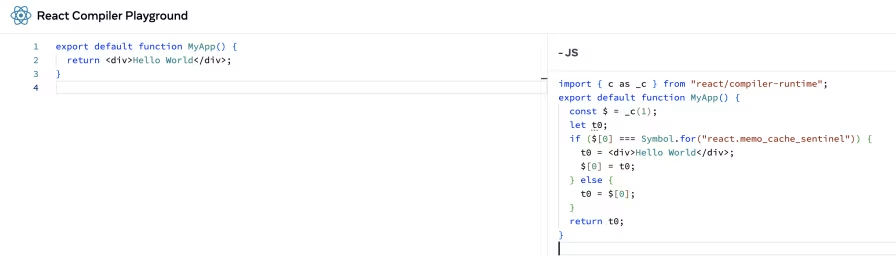
The output code may look like nonsense to you or me, but it's much faster to your machine.
This compilation requires that your code strictly follow the rules of React Hooks, behaves well with StrictMode, and broadly follows any other React rules that have been outlined in their ESLint rules.
This move has shown huge improvements for large-scale projects, but its core concepts aren't entirely new for React.
See, the React Compiler wasn't the first JavaScript compiler project Facebook has undertaken: as far back as 2017 Facebook was working on "Prepack", a generalized JavaScript compiler to take code and try to resolve as much logic as it could ahead-of-time:

While this project never left the experimental phase, it was clear that Facebook's engineering teams were considering this kind of route years ahead of the curve.
In face, in an interview with Dominic Gannaway, an ex-React core team member, he outlined that the history of investigations around the React Compiler predates Hooks. Yes, that's right, the rules of Hooks were not just created for the code at the time, but were a massive future-think from the team to enable functionalities like the current React Compiler.
And it's not like React is the only framework with required performance optimizations. Between Angular's runOutsideAngular from its Zone.js days to its modern OnPush detection strategies, Vue's v-memo and v-once, Lit's shouldUpdate, and even Solid.js' createMemo, it's clear that there's no silver bullet to performance, regardless of reactivity mechanism.
As we've learned about React's development through the years, a clear pattern emerges. The story of React is one built on a core philosophy that has matured in a number of ways over time.
Not only do the React teams' actions indicate a long-term thought process applied pragmatically through unwavering support of features new and old. However, the vision of React seems to me at least that they've kept a holistic view of the library's usage along all this time.
Whether we're talking about the virtual DOM, Hooks, or even RSCs, it's clear that React has stuck to these ideals. Put another way, no React feature exists in a vacuum.
It's this consistency and commitment to improvement that makes it clear that the React team has our best interests in mind.
Still hungry for more React learning?
Well, I've written a free book series teaching React, Angular, and Vue all at once that might spark your interest:

Subscribe to our newsletter to get updates on new content we create, events we have coming up, and more! We'll make sure not to spam you and provide good insights to the content we have.